Setting the clock on a Bosch oven might seem like a simple task, but it can be surprisingly confusing—especially if you’re using a new model or you’ve just had a power outage. A wrong time display can throw off your cooking schedule, mess up delayed starts, or even stop your oven from working properly if the timer is required to be set. This guide will walk you through every detail, step by step, so you never have to struggle with your Bosch oven’s clock again. You’ll also find helpful tables, examples, and solutions for common problems users face. Even if you’re not a native English speaker, you’ll find the explanations clear, simple, and easy to follow.
Why Setting The Oven Clock Matters
The clock on your Bosch oven is more than just a display; it’s a key part of how your oven works. When the clock is not set, you may have trouble using timed cooking features, delayed start, or even basic oven functions. Many Bosch ovens require the clock to be set before you can use the main cooking options. Also, the correct time helps you plan your meals, prevents overcooking or undercooking, and makes sure your kitchen runs smoothly.
Many people don’t realize that after a power outage, the oven’s clock often resets. That means your favorite preset programs or scheduled baking will not work until you set the clock again. In some models, a blinking display means the oven is waiting for you to set the time.
Types Of Bosch Oven Controls
Understanding your oven’s control panel is the first step. Bosch ovens come with different types of controls, and the method to set the clock can change depending on the model you have.
Common Control Panel Types
- Touchscreen controls – Modern ovens with digital displays and no physical buttons.
- Touch-sensitive buttons – Flat panels where you press icons or symbols.
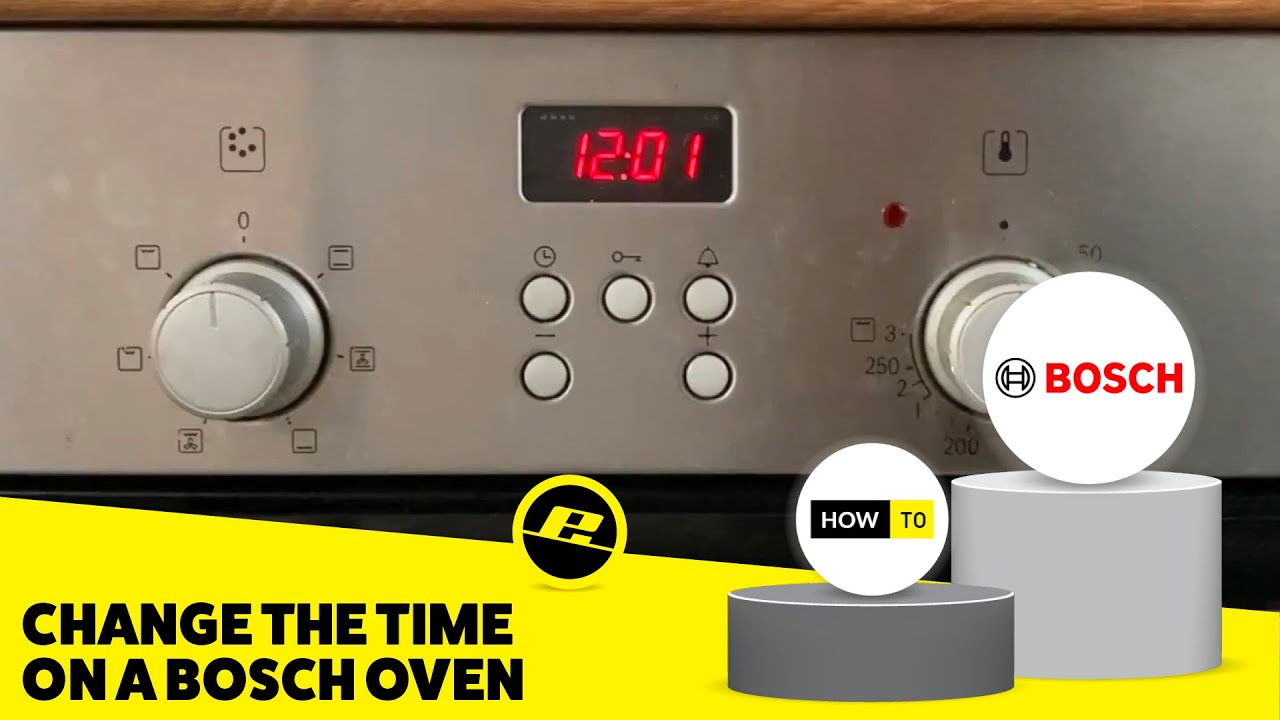
- Rotary knobs with digital display – Classic style with physical knobs and a small screen.
- Combination controls – Mix of buttons and knobs.
Some older Bosch ovens have only mechanical knobs and do not include a clock. For most people, their oven will fit into one of the above categories. If you’re unsure, check your oven’s user manual for the exact model number and control layout.
Example Models
Here’s a quick comparison of popular Bosch oven models and their control panels:
| Model | Control Type | Year Released | Clock Feature |
|---|---|---|---|
| Bosch HBG634BS1B | Touchscreen | 2019 | Yes |
| Bosch HBN331E2B | Rotary Knobs + Display | 2015 | Yes |
| Bosch Serie 4 HBA534BS0B | Touch Buttons | 2021 | Yes |
| Bosch HBN13L5.1 | Mechanical Knobs | 2010 | No |

Credit: www.reddit.com
Step-by-step: How To Set The Clock On Bosch Oven
The method to set the clock will depend on your Bosch oven’s control type. Here are detailed instructions for the most common designs.
For Touchscreen And Touch Button Models
- Wake up the display by pressing any button or touching the screen.
- If the clock is flashing or shows “–: –”, it’s ready to be set.
- Press the clock or timer button (usually marked with a clock symbol or “Time”).
- The hour digits should start blinking. Use the + or – buttons to set the hour.
- Press the clock or “OK” button again to move to the minutes.
- Adjust the minutes using the + or – buttons.
- Press “OK” or the clock button again to confirm.
- The clock should now show the correct time.
Example
If your oven shows 12:00 blinking, press the clock symbol once, tap + until you reach 14, press again, tap + until you reach 30, then press again to finish. The display will now show 14:30.
For Rotary Knob With Digital Display
- Locate the clock button (often marked with a clock or “Time” symbol).
- Press and hold the clock button for 3 seconds until the hour blinks.
- Turn the knob left or right to set the hour.
- Press the clock button again; the minutes start blinking.
- Turn the knob to set the minutes.
- Press the clock button to confirm.
For Combination Controls
Some ovens require you to hold a button while turning a knob. For example:
- Press and hold the “Clock” or “Time” button.
- While holding, rotate the knob to select the hour.
- Release and press again to set minutes.
- Adjust minutes the same way.
- Release and wait; the display will stop blinking, and the time is set.
Non-obvious Insight
On many Bosch ovens, if you do not press “OK” or stop adjusting for 5–10 seconds, the oven automatically saves the last time you set. Beginners often keep pressing buttons, thinking they must confirm with a special button, but waiting is enough.
Common Problems When Setting The Clock
Even with simple steps, things can go wrong. Here are some common issues and solutions.
The Clock Symbol Is Missing
Not all ovens have a separate clock symbol. Sometimes it’s combined with the timer or the “menu” button. If you can’t find it:
- Check for a button with a small clock or watch face symbol.
- Try pressing the timer button for a few seconds; many models use the same button for both functions.
The Display Is Not Responding
If the oven’s display is not reacting:
- Make sure the oven is plugged in and the child lock is not active.
- Try switching the oven off and on at the wall outlet.
- If the screen is still frozen, you may need to reset the oven (see troubleshooting below).
The Clock Keeps Resetting
If your oven loses time after every power cut:
- Some models have a backup battery that may be dead. Check your manual.
- Frequent resets can mean an electrical issue; contact Bosch service if this happens often.
The Time Is Not Saving
If the clock returns to “00:00” after setting:
- Ensure you finished all steps and waited for the display to stop blinking.
- Don’t unplug the oven immediately after setting—the time needs a few seconds to save.
Features Linked To The Bosch Oven Clock
The oven clock is not just for telling time; it controls several features:
- Delayed start – Allows you to start cooking at a later time.
- End time – Lets you set when you want the oven to stop cooking.
- Minute minder – Works as a kitchen timer independent of the oven’s operation.
- Automatic programs – Some recipes and programs require the clock to be set.
If the clock is wrong, these features may not work as expected. For example, a delayed start will be off by however many minutes the clock is incorrect.
Feature Comparison Table
Here’s how the clock interacts with different cooking functions:
| Feature | Requires Clock Set? | What Happens If Not Set? |
|---|---|---|
| Basic Baking/Grilling | No | Oven still works, but you can’t use delayed start or end time. |
| Delayed Start | Yes | Feature is unavailable or fails to start. |
| Auto Programs | Yes | Some programs cannot run until clock is set. |
| Minute Minder | No | Works, but not linked to oven operation. |
Resetting The Oven Clock After Power Outage
After a power outage, your Bosch oven’s clock will usually blink or display “–:–”. This means it needs to be set before you can use most timed functions.
- Wait for power to return.
- The display should be blinking.
- Follow the steps for your control type above to set the clock.
- If the display is not blinking, try pressing the clock or timer button for a few seconds.
Special Note
If your oven does not show a blinking display after a power cut, try unplugging it for 30 seconds and plugging it in again. This forces a reset.
Credit: www.youtube.com
Setting The Clock For Daylight Saving Time
Some Bosch ovens offer automatic daylight saving time adjustments, but many require you to change the time manually.
- If your oven does not auto-adjust, simply set the time forward or backward by one hour using the same steps as above.
- Check your oven’s manual or settings menu for a “DST” or “Summer Time” option.
Using The Timer And Clock Together
It’s easy to confuse the oven timer with the clock. The timer is used for counting down cooking time, while the clock shows the actual time of day.
- To use both, first set the clock.
- Then press the timer button (often a bell symbol) and set your countdown.
- The oven will beep when the timer reaches zero, but it won’t affect the clock.
Beginners often think the timer will turn off the oven automatically. On most Bosch ovens, the timer is just an alert; only the end time function will stop the oven.
How To Tell If Your Bosch Oven Needs The Clock Set
Not sure if you need to set the clock? Look for these signs:
- The display is blinking or shows “–: –”.
- You can’t use the delayed start or some auto programs.
- Error messages like “Set Time” or “Clock” appear.
If you never set the clock and your oven works fine, your model may not require it for basic cooking.
Setting The Clock Without A Manual
Lost your Bosch oven manual? Here’s how to figure out the clock:
- Identify your control panel type (touchscreen, touch button, knob, or combination).
- Look for any button with a clock or timer symbol.
- Try holding the button for 3–5 seconds; most ovens enter clock set mode this way.
- If there are + or – buttons, use them to adjust.
- Wait a few seconds to see if the time saves.
Tip: Search online for your Bosch oven’s model number and “manual” if you need extra help. Bosch’s official website has most manuals available for download.
Troubleshooting: When The Clock Won’t Set
Sometimes, the clock just won’t set or the display won’t change. Here’s what to check:
Child Lock Is On
Many Bosch ovens have a child lock feature to prevent accidental changes. If you see a key or padlock symbol, the controls are locked.
- To unlock: Press and hold the “key” button, or the clock and “+” together, for 5 seconds.
Power Issues
If your oven doesn’t respond, check your outlet and circuit breaker. Plug another device (like a lamp) into the same outlet to test.
Faulty Control Panel
If buttons don’t work or the display is broken, the control panel may need repair. Contact Bosch customer support or a qualified technician.
Error Codes
Some error codes mean the oven needs service. If you see “E” followed by a number, check your manual or the Bosch website for what it means.
Tips For Accurate Timekeeping
Most oven clocks are not radio-controlled, so they can drift by a few minutes each month. Here’s how to keep them accurate:
- Reset the clock every few months, especially after power cuts.
- Use your smartphone or a radio clock as a reference when setting.
- If you need exact timing for recipes, use a separate kitchen timer as backup.
The Hidden Value Of The Oven Clock
Few people realize that the oven clock can act as a backup kitchen timer, even when the oven is off. If your kitchen loses power, the clock display is a quick signal to check for outages. Also, some Bosch ovens synchronize with smart home systems—having the correct time can be essential for these features.
Table: Oven Clock Features By Bosch Series
If you’re buying or using a Bosch oven, the features linked to the clock can vary by series. Here’s a handy comparison:
| Bosch Series | Clock Setting Method | Delayed Start | Auto DST |
|---|---|---|---|
| Serie 2 | Buttons + Knob | Yes | No |
| Serie 4 | Touch Buttons | Yes | Yes (select models) |
| Serie 6 | Touchscreen | Yes | Yes |
| Serie 8 | Advanced Touchscreen | Yes | Yes |
Best Practices For Bosch Oven Owners
- Always set the clock after a power outage before you start cooking.
- For new ovens, set the clock before running the first “burn-in” (cleaning) cycle.
- Teach all family members how to adjust the clock—this avoids confusion.
- Write down your oven’s model number and keep it handy for reference.
- If you travel often, check the clock after you return home.
What If My Bosch Oven Has No Clock?
Some older Bosch ovens, or very basic models, don’t have a clock. In this case, you don’t need to worry about setting the time. Use a separate timer for your cooking needs.

Credit: www.reddit.com
When To Call Bosch Support
If you’ve tried all the steps and the clock still won’t set, it’s time to get help. Call Bosch customer support if:
- The display is dead or shows error codes after resetting.
- The clock resets constantly, even with stable power.
- Buttons or the control panel are unresponsive.
Have your model number and serial number ready. This will speed up the help process.
For more technical details, you can visit the official Bosch site: Bosch Customer Service.
Frequently Asked Questions
How Do I Set The Clock On My Bosch Oven After A Power Cut?
Press the clock or timer button until the display blinks, then use the + and – buttons to set hours and minutes. Confirm with the clock or “OK” button, or wait a few seconds for the time to save automatically.
My Bosch Oven’s Clock Keeps Blinking. What Does That Mean?
A blinking clock usually means the time is not set, or it needs to be confirmed. Set the time using the clock button and wait for the display to stop blinking.
Can I Set The Clock On A Bosch Oven Without The Manual?
Yes. Find the clock or timer symbol on your control panel, press and hold it for a few seconds, then adjust the time with the +/– buttons or knob. Most ovens follow this basic method.
Why Won’t My Bosch Oven Timer Turn Off The Oven?
The timer is just a reminder. To automatically turn off the oven, use the “end time” or “delayed start” features, which require the clock to be set correctly.
What Should I Do If My Bosch Oven’s Clock Resets All The Time?
If the clock resets after every power cut, this is normal. If it resets without reason, you may have a faulty backup battery or electrical problem. Contact Bosch support for help.
Setting the clock on your Bosch oven is a simple step that makes your cooking routine smoother and keeps your kitchen running on time. Once you know your model’s method, it takes less than a minute—no more guessing or frustration.
Accurate timekeeping means better meals, less stress, and reliable oven performance every day.