Every IGNOU student knows the feeling of waiting for grades. You finish your assignments, attend practicals, and sit for exams, then comes the long wait to see how you performed. The IGNOU Grade Card is the official record of your academic progress, but understanding how your grades are calculated can be confusing. Many students want to know their final grades before the official results. That’s where the IGNOU Grade Card Calculator comes in. It’s a useful tool that helps you estimate your marks and gives you a clear picture of your academic standing.
In this guide, you’ll learn everything about the IGNOU Grade Card Calculator: how the IGNOU grading system works, how to calculate your grades, how to use the calculator, and common mistakes to avoid. Whether you’re a new student or about to finish your degree, this article will help you understand your results and plan your next steps with confidence.
What Is An Ignou Grade Card?
The IGNOU Grade Card is an official document provided by Indira Gandhi National Open University (IGNOU) that shows your performance in assignments, term-end examinations (TEE), practicals, and projects. Each course you take has a separate entry, and the grade card is updated after every exam session. It is a key document for students, as it reflects their academic progress and eligibility for graduation.
There are different grade cards for:
- Bachelor’s programs
- Master’s programs
- Diploma and certificate courses
Each card includes:
- Course codes
- Assignment marks
- Theory marks (TEE)
- Practical marks (if applicable)
- Project marks (if applicable)
- Status (Completed/Not Completed)
You can access your grade card online through the IGNOU official website by entering your enrollment number and program code.
Understanding Ignou’s Grading System
Before using a grade card calculator, you need to understand how IGNOU evaluates students. The grading system is a mix of assignments, theory exams, and sometimes practical or project work.
Key Components
- Assignments: These are home-based projects you submit during the semester. Assignments usually carry 30% of the total marks.
- Term-End Examination (TEE): These are the final exams, often held in June and December, and usually carry 70% of the total marks.
- Practical/Project Work: Some courses (especially in science or management) have practicals or project work, which also count towards your grade.
Grading Scale
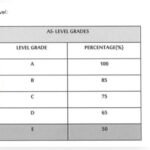
IGNOU uses a letter grading system, mapping percentage scores to grades and grade points. Here’s the common grading scale:
| Percentage (%) | Letter Grade | Grade Point |
|---|---|---|
| 80 and Above | A | 5 |
| 60 – 79.9 | B | 4 |
| 50 – 59.9 | C | 3 |
| 40 – 49.9 | D | 2 |
| Below 40 | E (Fail) | 1 |
Some programs may have slight variations, but this is the standard used for most undergraduate and postgraduate programs.
Minimum Passing Marks
To pass a course, you usually need:
- Assignment: At least 40% marks
- TEE (Theory Exam): At least 40% marks
- Practical/Project: At least 40% marks
If you fail any component, you need to reappear for that part in the next session.
Why Use An Ignou Grade Card Calculator?
Many students find it difficult to calculate their final grades manually. The IGNOU Grade Card Calculator helps you:
- Estimate your total score before official results are announced
- Check if you’ve passed in all required components
- Predict your final grade and cumulative grade point average (CGPA)
- Identify weak areas needing improvement
Using the calculator reduces anxiety and helps you plan whether you need to resubmit assignments or reappear for exams.
How The Ignou Grade Card Calculator Works
The grade card calculator is a simple tool, but you need to enter accurate information. Here’s how it works:
Step 1: Collect Your Marks
Before starting, collect your:
- Assignment marks for each course
- TEE marks for each course
- Practical/project marks (if applicable)
You get these from your assignments, the exam portal, or your latest grade card update.
Step 2: Calculate Weighted Marks
IGNOU gives different weightage to assignments, TEEs, and practicals. For most courses:
- Assignment: 30%
- TEE (theory): 70%
- Practical/Project: As mentioned in your course guide (often 30% or 50%)
Example Calculation
If you scored 25 out of 50 in an assignment and 48 out of 100 in the TEE:
- Assignment percentage: (25/50) x 100 = 50%
- TEE percentage: (48/100) x 100 = 48%
- Weighted assignment marks: 50 x 0.3 = 15
- Weighted TEE marks: 48 x 0.7 = 33.6
- Total weighted marks: 15 + 33.6 = 48.6
This is your final percentage for the course.
Step 3: Convert Percentage To Grade
Using the grading scale above, 48. 6% falls into the ‘D’ grade (2 grade points).
Step 4: Repeat For All Courses
Do this calculation for each course you have taken.
Step 5: Calculate Cgpa
Your Cumulative Grade Point Average (CGPA) is the average of grade points across all courses.
For example, if you have the following grades:
- Course 1: B (4 points)
- Course 2: C (3 points)
- Course 3: A (5 points)
CGPA = (4 + 3 + 5) / 3 = 4. 0
Ignou Grade Card Calculator: Detailed Example
Let’s go through a detailed example for a Bachelor’s program student with three courses:
| Course | Assignment Marks (Out of 100) | TEE Marks (Out of 100) | Weighted Assignment (30%) | Weighted TEE (70%) | Total (%) | Grade |
|---|---|---|---|---|---|---|
| Course 1 | 60 | 70 | 18 | 49 | 67 | B |
| Course 2 | 45 | 55 | 13.5 | 38.5 | 52 | C |
| Course 3 | 30 | 39 | 9 | 27.3 | 36.3 | E (Fail) |
- Course 1: Passed with B
- Course 2: Passed with C
- Course 3: Failed (must reappear in TEE)
This detailed calculation helps you know where you stand before the official grade card is released.
Different Types Of Ignou Grade Card Calculators
There are various calculators available online. They differ slightly in design, but their purpose is the same: to help you estimate your grades.
Official Ignou Calculator
IGNOU does not offer an official calculator tool, but its website explains the grading process. You can access your grade card and use the formulae given there.
Third-party Calculators
Many student websites and forums have built simple calculators. You enter your marks, and the tool does the math. Always use trusted websites, as some calculators may not update their grading logic when IGNOU changes its evaluation pattern.
Manual Calculation
Some students prefer to calculate grades manually, following the steps and formulae described above. This is useful if you want to double-check results from an online calculator.
Using An Ignou Grade Card Calculator: Step-by-step Guide
If you want to use an online calculator, here’s what you need to do:
- Go to a reliable calculator website (for example, ignoustudentzone.in or a popular IGNOU forum).
- Enter your assignment marks for each course.
- Enter your TEE marks.
- If required, enter practical or project marks.
- Click ‘Calculate’ or ‘Submit’.
- Review the results: The tool will show your weighted total, grade, and sometimes your grade point.
Tip: Double-check your marks before entering them. Even a small error can change your final grade.
Common Mistakes Students Make
Even with calculators, students make errors that affect their results. Here are some common mistakes and how to avoid them:
1. Wrong Weightage Used
Some courses (especially diplomas, practicals, or certain master’s programs) do not follow the standard 30% assignment and 70% TEE pattern. Always check your course guide or official IGNOU notification.
2. Mixing Old/new Syllabus
IGNOU sometimes updates its grading patterns. Make sure your calculator uses the latest structure for your session.
3. Ignoring Minimum Pass Marks
Even if your total is above 40%, you must pass *both* assignments and TEE separately. Failing in one means you must reappear, even if the average is a pass.
4. Not Including Practical/project Marks
For some science and management courses, practical/project marks are mandatory. Missing these can result in an incomplete grade.
5. Not Checking Official Grade Card
Calculators are for guidance only. Always verify your result with the official IGNOU grade card, as only that is accepted for degree purposes.

Credit: www.youtube.com
Tips For Accurate Grade Calculation
- Check your course booklet for the latest evaluation pattern.
- Use a calculator that matches your program.
- Keep all mark sheets and assignment grades handy.
- If in doubt, ask your IGNOU regional center for clarification.
How To Improve Your Ignou Grades
If your calculated grades are not what you hoped, don’t worry. There are ways to improve:
1. Resubmit Assignments
If you failed or scored low in assignments, you can resubmit them in the next session.
2. Reappear In Tee
Failed or want to improve your TEE marks? You can re-register for the exam and try again.
3. Attend Practical/project Sessions
For courses with practicals or projects, attend all required sessions and submit your work on time.
4. Focus On Weak Areas
Use your calculated results to identify which part needs more effort—assignments, theory, or practical.
5. Seek Guidance
IGNOU has study centers and online forums where you can get help with assignments and exam preparation.
Real Student Experiences With Grade Card Calculators
Students across India and abroad use grade card calculators to plan their academic path. Here are a few examples:
- Rohit (BA Sociology) used an online calculator after submitting his assignments. He found he was just 2% short of a ‘B’ grade and decided to focus more on the next TEE to improve his CGPA.
- Meera (MCA) calculated her project marks and realized she had failed the practical component. She registered for a special practical session and passed, allowing her to complete her degree on time.
- Amit (BCom) used manual calculation and found a mistake in his assignment marks uploaded online. He contacted his regional center, got it corrected, and his final grade improved.
These cases show why a calculator is not just about curiosity—it can directly affect your results and next steps.
Comparing Ignou Grade Card With Other Indian Universities
How does IGNOU’s grading system and calculator compare with other popular Indian universities? Here’s a simple comparison:
| University | Assignment Weightage | Theory Exam Weightage | Grading System |
|---|---|---|---|
| IGNOU | 30% | 70% | Letter Grades (A-E) |
| Delhi University (SOL) | 25% | 75% | Percentage/CGPA |
| Sikkim Manipal University | 30% | 70% | Letter Grades (A-F) |
Insight: IGNOU’s focus on assignments means students who do well in regular coursework can balance out lower exam scores—a big advantage for working professionals.

Credit: www.youtube.com
How To Access Your Official Ignou Grade Card
While calculators are useful, your official grade card is the final word. Here’s how to access it:
- Go to the official IGNOU results portal: Https://gradecard.ignou.ac.in/gradecard/
- Select your program (BA, MA, BCom, etc.)
- Enter your 9 or 10-digit enrollment number
- Click ‘Submit’
- Your grade card will appear, showing completed and pending components
Tip: Download and save a copy every time you check, in case you need to show it for jobs or further studies.
When Do Ignou Grade Cards Get Updated?
Grade cards are updated after:
- Each TEE session (June/December)
- Assignment submission deadlines
- Practical/project evaluations
It may take 4–8 weeks for all marks to appear after exams or assignment deadlines. If your marks are missing or incorrect, contact your regional center with proof of submission.
What If There’s A Mistake In Your Grade Card?
Mistakes happen. If you find errors in your grade card (missing marks, wrong scores, etc.):
- Contact your study center or regional center immediately
- Provide copies of your assignment submission receipt, exam admit card, or any other proof
- Follow up regularly until the correction is made
IGNOU sometimes takes time to update records, so patience and regular follow-up are important.
Benefits And Limitations Of Using A Grade Card Calculator
Benefits
- Quick estimation of scores and grades
- Helps you plan resubmissions or re-exams
- Reduces anxiety while waiting for official results
- Identifies areas needing improvement
Limitations
- Only as accurate as the data you enter
- May not reflect last-minute changes by IGNOU
- Not valid for official use (only advisory)
Pro tip: Always cross-check with the official portal for the latest updates.
Hidden Insights Most Students Miss
- Your assignment and TEE marks are not just added—they’re weighted. Many students wrongly add marks without applying the correct percentage (30%/70%). This can give a misleading result.
- CGPA is the average of grade points, not percentage. Some students mistakenly calculate their average as a percentage, but IGNOU uses grade points for CGPA.
- Failing in any one component (assignment, TEE, practical) means you must redo only that part, not the whole course. This is a relief for many students and lets you focus your efforts.
- Project and practical marks are sometimes updated late. Don’t panic if these are missing from your grade card right after the main exam results.
Alternative Ways To Track Your Ignou Progress
Apart from calculators, you can:
- Keep an Excel sheet of your marks for each course
- Use IGNOU’s eGyanKosh platform for updated notifications
- Join student WhatsApp or Telegram groups for tips and reminders
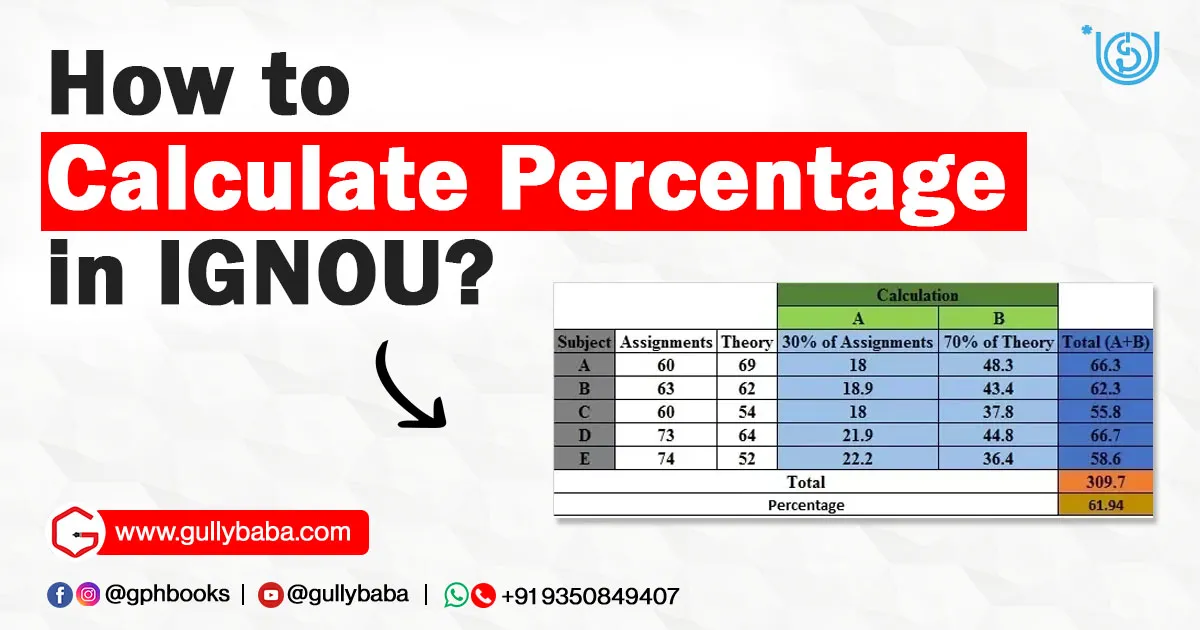
Credit: www.gullybaba.com
Useful External Resource
For more details about the grading system and official notifications, visit the IGNOU Official Website.
Frequently Asked Questions
How Do I Calculate My Ignou Grade Manually?
To calculate your IGNOU grade manually:
- Find your assignment and TEE marks for each course
- Apply the weightage: Assignment (30%), TEE (70%)
- Add weighted marks to get your total percentage
- Match the percentage to the grade scale (A, B, C, D, E)
- Average your grade points across courses to get your CGPA
What If My Assignment Marks Are Missing On The Grade Card?
If your assignment marks are missing:
- Check if you submitted assignments on time
- Contact your study or regional center with your receipt
- Marks may take time to upload, especially after deadlines
Can I Use Any Online Calculator For All Ignou Courses?
No. Some courses have different weightage or grading systems, especially diplomas, practical courses, or new programs. Always check your course guide and use a calculator that matches your syllabus.
What Is The Passing Mark For Ignou Assignments And Tees?
You need at least 40% in both assignments and TEEs separately. Scoring below 40% in any one means you must resubmit or reappear for that part.
Is The Ignou Grade Card Calculator Result Official?
No. The calculator is only for your estimation. The official result is what appears on the IGNOU grade card portal after evaluation.
—
The IGNOU Grade Card Calculator is a handy tool for students to estimate their grades, track progress, and plan their academic journey. But remember, it is only a guide. Always check your official grade card for the final result. Understanding the grading system, using calculators wisely, and staying updated with IGNOU notifications will help you succeed in your studies, avoid common mistakes, and complete your degree with confidence.